0 ratings




Nº de artículo:
814878
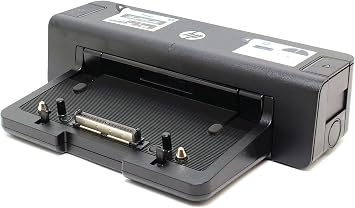
HP A7E32 90W Docking Station - Port Replicator - A7E32AA
86% de los encuestados recomiendan este producto a un amigo
Nº de artículo:
814878
MXN 1063
Detalles del precio
Sin incluir gastos de envío y aduana ( Los gastos de envío y aduana se calcularán al finalizar la compra )
*Todos los artículos se importarán desde Estados Unidos
0 ratings
Escribe una reseña
En stock
 Importado de la tienda de EE.UU.
Haz tu pedido ahora y lo recibirás alrededor del Miércoles, Octubre 07
Transacción Segura
Ubuy trabaja arduamente para proteger tu seguridad y privacidad. Nuestro avanzado sistema de seguridad de pagos garantiza la confidencialidad al cifrar tu información durante la transmisión mediante los protocolos AES (Estándares de Cifrado Avanzado) y SSL (Capa de Conexión Segura). Tus datos de pago están 100% seguros, ya que no compartimos tu información de pago con vendedores externos.
Nuestros socios logísticos principales


Fast
Shipping

Devolución
gratuita*

Empaque seguro

Productos 100% originales

Cumplimiento PCI DSS

Certificado ISO 27001



Detalles de producto
| Brand | HP |
| Color | Black |
| Hardware Interface | USB 3.0 |
| Compatible Devices | HP ELITEBOOK 8xxx Series |
| Total USB Ports | 4 |
| Number of Ports | 14 |
| Item Weight | 4.3 pounds (1.95 kg) |
| Wattage | 90 watts |
| Number of Items | 1 |
| UPC | 887111347237 804066549561 886112501693 |
DESCRIPCIÓN DEL PRODUCTO
HP A7E32 90W Docking Station - Port Replicator - A7E32AA
¿Tiene alguna pregunta? Chatea con nosotros
Preguntas y respuestas de los clientes
-
pregunta: ¿Cómo comprar HP A7E32 90W Docking Station - Port Replicator - en línea desde Ubuy?
respuesta: Es fácil comprar HP A7E32 90W Docking Station - Port Replicator - en línea desde Ubuy.. Solo tiene que buscar el producto, elegir su método de envío al pagar y recibirlo en su ubicación. -
pregunta: ¿Está HP A7E32 90W Docking Station - Port Replicator - disponible para comprar en línea en Mexico?
respuesta: Sí, en Ubuy Mexico, este producto está disponible para que lo compre a un precio razonable.. El HP A7E32 90W Docking Station - Port Replicator - no está disponible localmente, pero puede confiar en nosotros con nuestros servicios de envío exprés. -
pregunta: ¿Cuánto tiempo se tarda en obtener el producto después de realizar el pedido?
respuesta: El tiempo de entrega de su producto pedido varía según lo que haya pedido y el método de envío que haya elegido.. El tiempo de entrega estimado se menciona durante el proceso de pago, así que no se preocupe mientras compra.
HP Docking Stations Editorial Review
No se encontraron reseñas editoriales
Reseña y calificación de los clientes
1 calificaciones de los clientes
-
5 estrellas
100%
-
4 estrellas
0%
-
3 estrellas
0%
-
2 estrellas
0%
-
1 estrellas
0%
Reseñe este producto
Comparta su opinión con otros clientes
CONFIANZA EN LA PLATAFORMA Y PROTECCIÓN AL COMPRADOR

JK
Jasmin
Verified buyer
“Great products and very good service: very easy and very fast international delivery.”
9 September 2026 · via Trustpilot
AG
Anke
Verified buyer
“Wonderful online shopping experience, smooth transaction from the start. Payment method works conveniently and delivery is unexpectedly fast and reliable. You go the extra mile for service. What makes this even more amazing, you deliver to Namibia. I will remain a happy Ubuy customer and will increase my purchases for sure! Thank you!”
10 September 2026 · via Trustpilot
H
Hazel
Verified buyer
“Very easy to find the products what you need, and so fast delivery, that’s why I highly recommended to others costumers to used ubuy.”
10 September 2026 · via Trustpilot
O
Opaleye
Verified buyer
“I received exactly what I ordered I was skeptical about your site because that was my first time to order. But the order came timely and neatly packaged. I was not disappointed. Thank you.”
11 September 2026 · via Trustpilot
AC
Adele
Verified buyer
“Easy to find and order what you want on the website. Delivery is quick to the UK”
8 September 2026 · via Trustpilot
Pago seguro
Entrega mundial
Devoluciones fáciles
Productos originales
Historial de precios del producto
Información importante
- Limitaciones: Para los productos enviados al extranjero, ten en cuenta que cualquier garantía del fabricante puede no ser válida; las opciones de servicio del fabricante pueden no estar disponibles; los manuales del producto, las instrucciones y las advertencias de seguridad pueden no estar en los idiomas del país de destino; los productos (y los materiales que los acompañan) pueden no estar diseñados de acuerdo con las normas, especificaciones y requisitos de etiquetado del país de destino; y los productos pueden no ajustarse al voltaje del país de destino y a otras normas eléctricas (lo que requiere el uso de un adaptador o convertidor, si procede). El destinatario es responsable de asegurarse de que el producto puede ser importado legalmente al país de destino. Cuando hagas un pedido a Ubuy o a sus filiales, el destinatario es el importador registrado y debe cumplir todas las leyes y normativas del país de destino.
- No todos los productos que aparecen en Ubuy están a la venta, ya que Ubuy es un motor de búsqueda a nivel mundial. Los productos están sujetos a las normas de exportación/comercio.
MXN 1063
Haz tu pedido ahora y lo recibirás alrededor del Miércoles, Octubre 07
Este producto no está restringido en mi país. (Por favor haga click en el link de arriba si este producto no está restringido en su país, para que nuestro equipo pueda verificarlo y permitir la compra).
CANT.:
Transacción Segura
Cumplimos con PCI DSS y contamos con certificación ISO 27001:2022, con pagos cifrados y protección total al comprador en cada pedido.
Nuestros socios logísticos principales
La entrega internacional más rápida
Garantía Ubuy
Disfruta de compras sin preocupaciones con productos 100% originales, seguridad de pago certificada por PCI DSS, protección de datos con certificación ISO 27001, la entrega internacional más rápida, devoluciones gratis y empaque seguro en cada pedido.*