0 ratings






Nº de artículo:
220464923
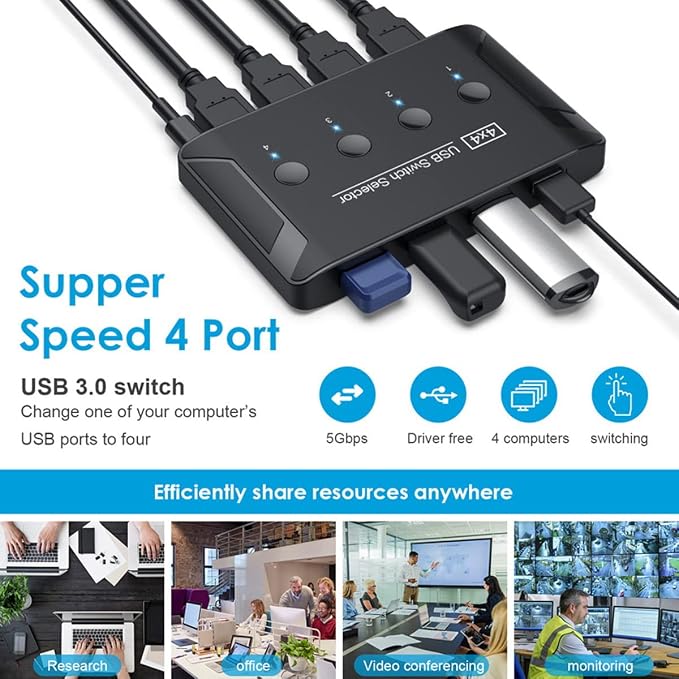
Cablecc KVM USB 3.0 Switch Selector 4 Port PCs Sharing 4 Devices for Keyboard Mouse Scanner Printer
85% de los encuestados recomiendan este producto a un amigo
Nº de artículo:
220464923
MXN 1445
Detalles del precio
Sin incluir gastos de envío y aduana ( Los gastos de envío y aduana se calcularán al finalizar la compra )
*Todos los artículos se importarán desde Estados Unidos
En stock
 Importado de la tienda de EE.UU.
CANT.:
Solo quedan 7 artículos en existencia.
Haz tu pedido ahora y lo recibirás alrededor del Martes, Agosto 25
Transacción Segura
Ubuy trabaja arduamente para proteger tu seguridad y privacidad. Nuestro avanzado sistema de seguridad de pagos garantiza la confidencialidad al cifrar tu información durante la transmisión mediante los protocolos AES (Estándares de Cifrado Avanzado) y SSL (Capa de Conexión Segura). Tus datos de pago están 100% seguros, ya que no compartimos tu información de pago con vendedores externos.
Nuestros socios logísticos principales


Support 8K@60Hz,4K@120Hz,1080P@240Hz resolution, provide you with transfer rates up to 48Gbps.

Fast
Shipping

Devolución
gratuita*

Empaque seguro

Productos 100% originales

Cumplimiento PCI DSS

Certificado ISO 27001




Lo que destaca
Multiple Device Support
Effortlessly connect and switch between up to four PCs or devices with this KVM switch, enhancing productivity without the clutter of multiple keyboards and mice.
USB 3.0 Technology
Utilizing USB 3.0, this switch offers high-speed data transfer rates, ensuring rapid communication between devices, perfect for intensive tasks like video editing or large file transfers.
User-Friendly Switching
The easy-to-use design with simple button switching allows users to connect or swap devices swiftly, promoting an efficient workspace without technological hassle.
Detalles de producto
| Operation Mode | manual |
| Current Rating | 2 A |
| Operating Voltage | 5 volts |
| Contact Type | Normally Open |
| Connector Type | Usb |
| Switch Type | Touch Switch |
| Terminal | Button |
| Circuit Type | 4-way |
| Actuator Type | Push Button |
| Number of Positions | 4 |
| Control Method | Touch |
| Connectivity Protocol | Wi-Fi |
| Wattage | 10 watts |
| Control Type | Manual |
| Compatible Devices | Personal Computer |
| Color | Black USB 3.0 |
| Item Dimensions | 3.94 x 3.94 x 0.39 inches (10 x 10 x 1 cm) |
| Unit Count | 1 Count |
| Number of Items | 1 |
| Material Type | Plastic |
| Contact Material | Plastic |
| Brand Name | cablecc |
| Model | db71d66d-1335-4cf3-8cfc-5fc292ac6d00 |
| Manufacturer | cablecc |
| Item Weight | 9.07 g |
| Part Number | U3-040 |
| Brand | cablecc |
| Material | Plastic |
| Item dimensions L x W x H | 3.94 x 3.94 x 0.39 inches (10 x 10 x 1 cm) |
¿Quién debería comprarlo?

-
Office Workstations
Ideal for professionals needing to switch between multiple PCs for keyboard and mouse use seamlessly.
-
Home Office Setup
Perfect for remote workers who require easy access to multiple devices like printers and scanners.
-
Tech Enthusiasts
Great for users who want to connect and manage multiple devices without cluttering cables or ports.

-
Gaming Setup
Not ideal for gamers requiring low latency and specific device optimization that KVM switches may limit.
DESCRIPCIÓN DEL PRODUCTO
¿Tiene alguna pregunta? Chatea con nosotros
Preguntas y respuestas de los clientes
-
pregunta:
What is a KVM switch and how does it work?
respuesta: A KVM switch allows you to control multiple computers using a single keyboard, video monitor, and mouse. By connecting multiple PCs to the switch, you can easily toggle between them without needing separate peripherals for each. This is particularly useful in offices or environments where space is limited, allowing for efficient multitasking and device management. -
pregunta:
Can I use the Cablecc KVM USB 3.0 Switch with multiple operating systems?
respuesta: Yes, the Cablecc KVM USB 3.0 Switch supports various operating systems including Windows, macOS, and Linux. This versatility makes it an excellent choice for users who operate different systems or want to share peripherals between diverse computers without compatibility issues. You can easily switch between operating systems with just a press of a button. -
pregunta:
What devices can I connect to the Cablecc KVM switch?
respuesta: You can connect up to four devices such as PCs, laptops, printers, scanners, and monitors. This flexibility allows you to share peripheral devices among various computers, improving productivity and reducing clutter. For instance, a graphic designer might switch between a desktop for designing and a laptop for client presentations seamlessly. -
pregunta:
How do I switch between devices using this KVM switch?
respuesta: Switching between devices with the Cablecc KVM switch is simple. You can use a physical button on the switch itself or a hotkey command via your keyboard. This ease of use allows for instant transitions, helping you to maximize workflow without any interruptions. It’s particularly beneficial for users who frequently switch tasks or need to monitor multiple systems simultaneously. -
pregunta:
Does the Cablecc KVM USB 3.0 Switch support audio?
respuesta: No, the Cablecc KVM USB 3.0 Switch does not support audio switching. It is designed primarily for video and peripheral devices. Users needing audio management may need separate solutions for audio output or opt for a different KVM model that includes audio capabilities. This is crucial for scenarios where audio feedback is integral to the workflow. -
pregunta:
What are the benefits of using USB 3.0 with the KVM switch?
respuesta: The inclusion of USB 3.0 technology in the KVM switch ensures high-speed data transfer and connectivity. This is particularly advantageous when using high-performance peripherals such as external drives or printers. Users can experience faster file transfers and improved responsiveness, making it ideal for resource-intensive tasks, such as video editing or gaming. -
pregunta:
Is installation difficult for the Cablecc KVM switch?
respuesta: Installation is straightforward and usually requires minimal technical skills. Simply connect your devices to the appropriate ports on the switch and plug it into your power source and monitors. The plug-and-play capability means that you can use the switch immediately without installing additional software. This simplicity is perfect for users who may not be tech-savvy or who need a quick setup. -
pregunta:
Can I use this KVM switch for gaming?
respuesta: Yes, the Cablecc KVM USB 3.0 Switch can be used for gaming, especially if you want to switch between a gaming PC and a different setup seamlessly. Players can benefit from reduced clutter, allowing for a more organized gaming station. Additionally, the USB 3.0 connection can support high-performance gaming peripherals, enhancing the overall gaming experience. -
pregunta:
What is the maximum resolution supported by this KVM switch?
respuesta: The Cablecc KVM USB 3.0 Switch typically supports video resolutions up to 4K. This means you can enjoy sharp, clear visuals, making it suitable for graphic designers, video editors, and gamers alike. Whether you’re playing games or working with high-resolution graphics, this KVM switch can accommodate your needs without sacrificing quality. -
pregunta:
Where can I buy the Cablecc KVM USB 3.0 Switch Selector in Mexico?
respuesta: You can buy the Cablecc KVM USB 3.0 Switch Selector on Ubuy, a reliable online shopping platform. Ubuy offers a wide range of electronics and peripherals, making it easy to find and order the switch conveniently from your own home. The platform often provides a user-friendly experience with a focus on customer satisfaction.
cablecc KVM Switches Editorial Review
No se encontraron reseñas editoriales
Reseña y calificación de los clientes
10 calificaciones de los clientes
-
5 estrellas
45%
-
4 estrellas
34%
-
3 estrellas
21%
-
2 estrellas
0%
-
1 estrellas
0%
Reseñe este producto
Comparta su opinión con otros clientes
Ventajas
- High-quality materials
- User-friendly design
- Excellent customer support
- Durable and long-lasting
- Stylish appearance
Desventajas
- Minor learning curve for new users
CONFIANZA EN LA PLATAFORMA Y PROTECCIÓN AL COMPRADOR

MA
Mohammad
Verified buyer
“Excellent quality and original too,when ubuy send original things I will appreciate that ,I very satisfied thank you”
23 July 2026 · via Trustpilot
CK
Chitra
Verified buyer
“The order and delivery progress was communicated very well. Package arrived within the estimated time. Products arrived as expected in good condition.”
22-Jul-26 · via Trustpilot
K
kund
Verified buyer
“Good supply of products. Safe payment methods, and shipment worldwide! Genuine products.”
23-Jul-26 · via Trustpilot
OO
Onesi
Verified buyer
“Was my first time buying a product from Ubuy, but I found it so helpful. This is reliable. Gonna place a new order!”
22 July 2026 · via Trustpilot
SJ
SAO JOHN
Verified buyer
“Ubuy is a great online platform to buy stuff. Reliable, fast delivery time and great value for money. I've been using Ubuy online shopping platform for three years now and will continue to do so.”
23 July 2026 · via Trustpilot
Pago seguro
Entrega mundial
Devoluciones fáciles
Productos originales
Historial de precios del producto
Información importante
- Limitaciones: Para los productos enviados al extranjero, ten en cuenta que cualquier garantía del fabricante puede no ser válida; las opciones de servicio del fabricante pueden no estar disponibles; los manuales del producto, las instrucciones y las advertencias de seguridad pueden no estar en los idiomas del país de destino; los productos (y los materiales que los acompañan) pueden no estar diseñados de acuerdo con las normas, especificaciones y requisitos de etiquetado del país de destino; y los productos pueden no ajustarse al voltaje del país de destino y a otras normas eléctricas (lo que requiere el uso de un adaptador o convertidor, si procede). El destinatario es responsable de asegurarse de que el producto puede ser importado legalmente al país de destino. Cuando hagas un pedido a Ubuy o a sus filiales, el destinatario es el importador registrado y debe cumplir todas las leyes y normativas del país de destino.
- No todos los productos que aparecen en Ubuy están a la venta, ya que Ubuy es un motor de búsqueda a nivel mundial. Los productos están sujetos a las normas de exportación/comercio.
MXN 1445
Haz tu pedido ahora y lo recibirás alrededor del Martes, Agosto 25
Este producto no está restringido en mi país. (Por favor haga click en el link de arriba si este producto no está restringido en su país, para que nuestro equipo pueda verificarlo y permitir la compra).
CANT.:
Solo quedan 7 artículos en existencia.
Transacción Segura
Cumplimos con PCI DSS y contamos con certificación ISO 27001:2022, con pagos cifrados y protección total al comprador en cada pedido.
Nuestros socios logísticos principales
La entrega internacional más rápida
Características y beneficios
- Easily connect two HDMI sources to one display.
- Supports stunning 8K@60Hz and 4K@120Hz resolutions.
- Delivers up to 48Gbps transfer rates for superior performance.
- Designed for quick & easy input switching with the press of a button.
- Plug and Play setup with external 5V USB power requirement.
- Backward compatibility with all previous HDMI standards.
Garantía Ubuy
Disfruta de compras sin preocupaciones con productos 100% originales, seguridad de pago certificada por PCI DSS, protección de datos con certificación ISO 27001, la entrega internacional más rápida, devoluciones gratis y empaque seguro en cada pedido.*